
Welcome to the official documentation for DBH Shield & Traffic Analytics, a modular, high-performance security framework and analytics engine for WordPress. Engineered according to the KISS (Keep It Simple, Stupid) design principle, this plugin provides advanced server-level protection and deep traffic analytics without slowing down your website.
Unlike traditional, heavy security plug-ins that execute complex PHP code for every request, DBH Shield integrates directly with your server configuration (.htaccess) to deflect malicious actors before they ever reach your WordPress installation, while providing an industry-standard, standalone traffic audit layer.
1. High-Performance Traffic Analytics (AWStats Engine)
The core monitoring layer of DBH Shield features an integrated, standalone reporting dashboard inspired by the professional AWStats architecture. Instead of relying on heavy Javascript tracking scripts that inflate page load times and trigger ad-blockers, DBH Shield records and processes structural HTTP request metadata natively at the server init layer.
Daily History & Traffic Estimation
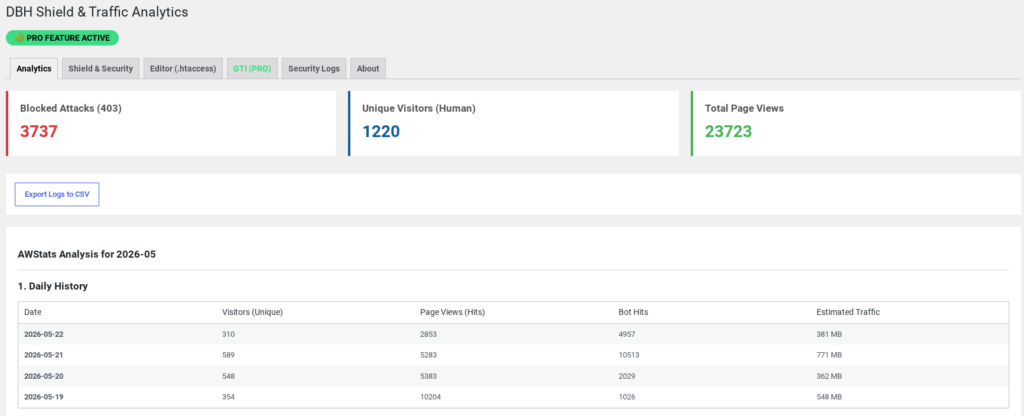
- Description: Provides a structural, day-by-day audit trail of your site’s activity throughout the current month.
- Metrics: Tracks accurate metrics for unique human visitors, overall raw page views (hits), and structural automated scanner loads (bot hits).
- Bandwidth Auditing: Automatically calculates and displays a reliable estimate of your data consumption (Estimated Traffic), giving you real-time visibility into bandwidth utilization without any hosting control panel access.
Hourly Statistics (Server Time)
- Description: A comprehensive 24-hour visual grid highlighting system request distribution.
- Mechanism: Isolates server hits by the exact hour of execution. It automatically highlights peak traffic windows, helping administrators identify natural traffic spikes or coordinate structural system maintenance during low-load intervals.
Most Accessed Page URLs & Host Statistics
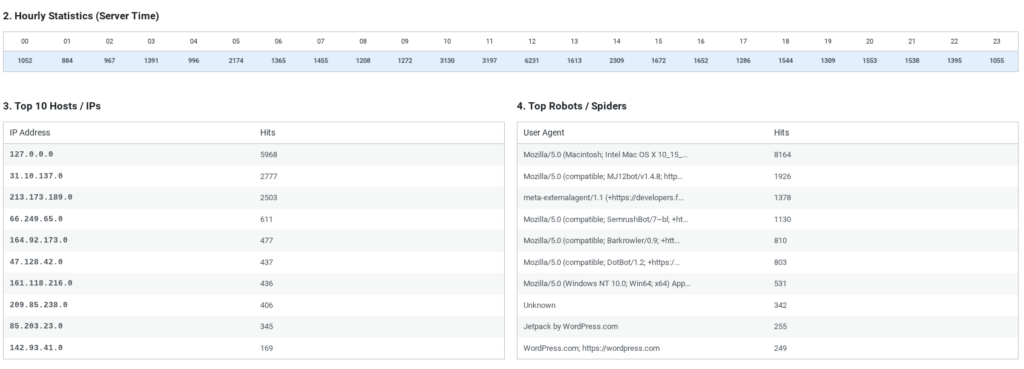
- Description: Granular insight into request destinations and client origins.
- Hosts Matrix: Displays the Top 10 client IP addresses generating requests across your platform, instantly exposing malicious bandwidth hogs or scrape behavior.
- URL Analysis: Highlights the most frequently requested end-points. Crucially, the system features built-in intelligence that automatically flags suspicious patterns—such as aggressive request chains hitting
wp-login.php—and highlights them in red to catch your attention instantly.
Top Robots & Spiders (Search Engine Auditing)
- Description: Separates legitimate human engagements from background machine requests.
- Mechanism: The built-in parsing engine cross-references browser payloads against a hardened catalog of known crawling signatures (e.g., Googlebot, Bingbot, Semrush, Ahrefs). This allows you to audit indexing efficiency while ensuring automated scraping behavior is clearly distinguished from real human traffic.
2. Core Security Features & Configuration
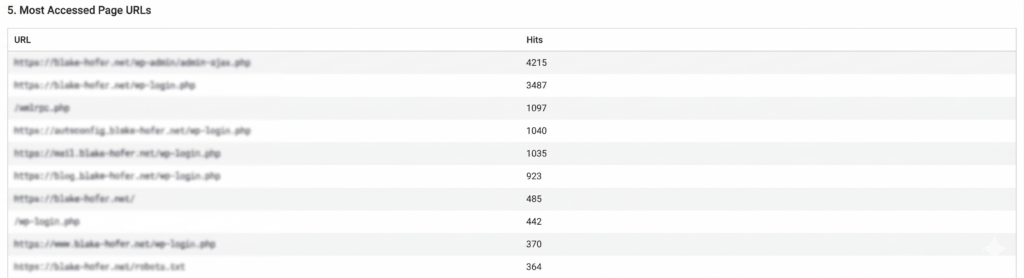
Sensitive Files Protection
- Description: Publicly accessible log files and configuration assets are prime targets for automated vulnerability scanners. When enabled, this feature injects real-time blocking rules into your server configuration.
- What it protects: It completely seals off sensitive entry points such as
debug.log, structural framework outputs, configuration setups (wp-config.php), and internal framework logs. Any unauthorized public request to these files is immediately rejected with a hard server-level 403 Forbidden response.
XML-RPC Interface Block
- Description: The legacy WordPress XML-RPC interface is frequently exploited by hackers to launch massive Brute-Force and Distributed Denial of Service (DDoS) amplification attacks.
- Mechanism: Turning this on completely deactivates the XML-RPC gateway. This eliminates a critical network vulnerability while freeing up substantial server bandwidth.
Advanced Comment Spam Protection
- Description: Automated spam bots bypass front-end forms to post malicious links directly to
wp-comments-post.php. - Mechanism: DBH Shield evaluates incoming network payloads and signature headers. If an automated script or a known generic spam user-agent attempts to force a comment injection, the request is instantly dropped at the server perimeter.
Force HTTPS
- Description: Secures all unencrypted data transmissions on your site.
- Mechanism: It enforces a structural 301 Permanent Redirect, automatically routing all incoming unsecured HTTP traffic to encrypted HTTPS connections.
Directory Listing Block
- Description: By default, some web servers allow users to browse folder contents if an index file is missing, exposing plugin and upload structures.
- Mechanism: Applies an unconditional
Options -Indexesrule to your root configuration, making folder layouts invisible to attackers and directory harvesting tools.
Privacy (GDPR Compliance)
- Description: Standard security logging captures full IP addresses, which violates modern privacy laws without explicit user consent.
- Mechanism: When active, the system sanitizes structural tracking data in real time, truncating IPv4 and IPv6 string segments to preserve absolute legal compliance while keeping statistical analytics intact.
3. Advanced Protection Layers (PRO Mode)
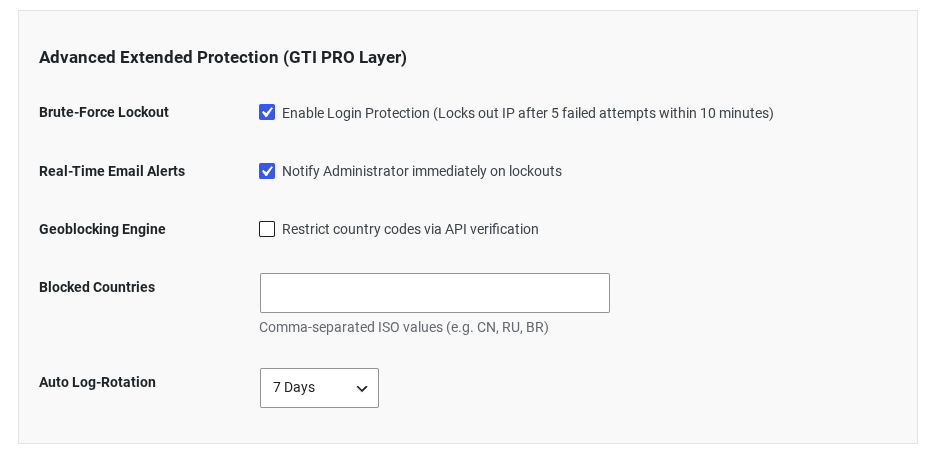
Brute-Force Lockout Engine
- Description: Malicious scripts attempt thousands of combinations to break into your administrator accounts.
- Brute-Force Limit Configuration: Administrators can dynamically define an exact threshold for failed attempts (Default:
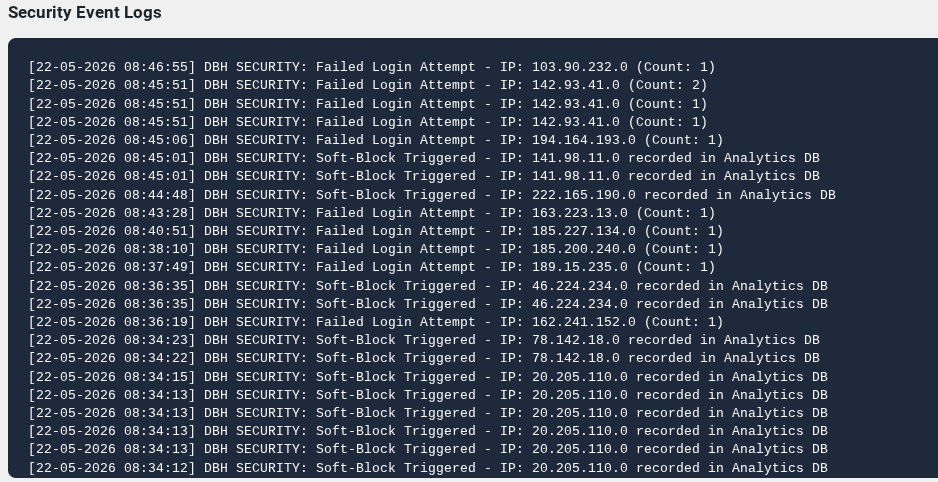
5). - Mechanism: The engine monitors login payloads using non-persistent high-performance transients. If an IP address exceeds the configured threshold within a rolling 10-minute window, it is locked out instantly. The system records a structured security event, desynchronizes the session, and presents a hardened defensive block page.
Real-Time Email Alerts
- Description: Instant situational awareness for critical infrastructure events.
- Mechanism: Whenever the Brute-Force Engine or structural access triggers a full lockout, the plugin throttles and sends an encrypted notification to the system administrator, complete with stylized contextual block information.
Geoblocking Engine
- Description: Many cyber threats originate from specific regional networks that do not align with your target audience.
- Mechanism: The engine runs active region-code verification. By supplying a comma-separated array of standard ISO country codes (e.g.,
CN, RU, BR), administrators can restrict entire geographical zones from accessing any system asset, reducing the attack surface by up to 90%.
Manual .htaccess Editor
- Description: Direct structural control over the Apache server layout.
- Mechanism: Provides an advanced, unfiltered terminal block inside the WordPress dashboard for senior engineers to write custom routing loops and caching rules. For safety, the editor automatically generates a standalone recovery snapshot (
.htaccess.bak_manual) in your root directory before committing changes.
4. Global Threat Intelligence (GTI)
The crown jewel of the PRO edition is the Global Threat Intelligence (GTI) network—a collaborative defense layer that turns isolated websites into a unified security ecosystem.
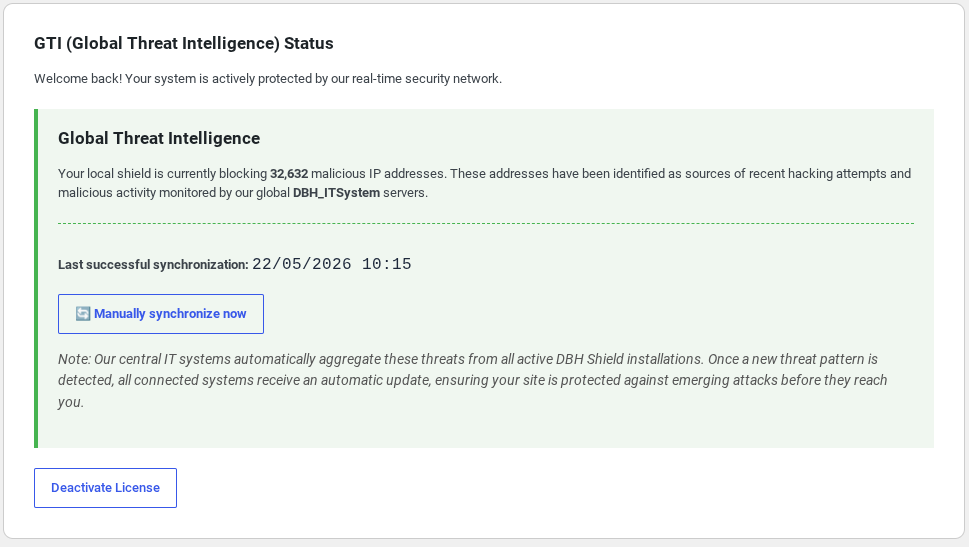
How GTI Works:
- Local Detection: When a malicious actor or botnet group launches a Brute-Force attack against any website running DBH Shield PRO, the local engine flags the signature.
- Network Feedback: The local instance securely signs the payload using a cryptographically secure SHA-256 HMAC protocol and transmits the threat report to our central aggregation nodes.
- Confidence Scoring: To prevent any accidental blocks or false-positives (such as a legitimate user mistyping a password), the central intelligence network runs an automated verification loop. An IP address must be independently reported across multiple distinct network instances to achieve a high confidence score.
- Data Pruning (Auto-Aging): Because hackers constantly migrate across temporary cloud networks, threat lists can become bloated. The central GTI hub automatically prunes entries whose last activity is older than 30 days, keeping the global defensive list lean and ultra-performant.
- Instant Synchronization: Connected PRO clients automatically stream this curated threat list down to their server perimeter using optimized background processes. Threats are blocked before they can ever attempt a single exploit on your site.
5. Free vs. Pro Version Comparison
| Feature | DBH Shield Free | DBH Shield PRO |
| High-Performance Traffic Analytics | ✅ Included | ✅ Included |
| AWStats Monthly/Hourly Analysis | ✅ Included | ✅ Included |
Sensitive Files Protection (debug.log) | ✅ Included | ✅ Included |
| XML-RPC Gateway Blocking | ✅ Included | ✅ Included |
| Directory Listing Prevention | ✅ Included | ✅ Included |
| Force HTTPS (301 Routing) | ✅ Included | ✅ Included |
| GDPR IP Anonymization | ✅ Included | ✅ Included |
| Log Rotation Customization | ❌ 30 Days Fixed | ✅ 7 / 30 / 90 Days or Forever |
| Dynamic Brute-Force Protection | ❌ No | ✅ Yes (Customizable Limits) |
| Real-Time Administrator Alerts | ❌ No | ✅ Yes (With Cooldown Throttling) |
| Geoblocking Engine (ISO Restricting) | ❌ No | ✅ Yes |
| Manual Server Configuration Editor | ❌ No | ✅ Yes (With Auto-Backup) |
| Global Threat Intelligence (GTI) Feed | ❌ No | ✅ Yes (Over 30,000+ Blocked IPs) |
| Collaborative Network Reporting | ❌ No | ✅ Yes (Automated HMAC Reporting) |
6. Subscription Pricing
DBH Shield PRO offers flexible licensing plans tailored to your infrastructure requirements:
- Monthly Protection Pass: 5.99 USD / month
- Semi-Annual Security Plan: 29.99 USD / 6 months
- Annual Enterprise License: 59.99 USD / year (Best Value)
All subscriptions include real-time Global Threat Intelligence streaming updates, server-level defensive upgrades, and automated patch management.